
browser-remote — a real, clickable window into a headless Chrome
Why I built a single Docker image that gives you an actual tab bar and a live, interactive screen for a headless Chromium instance — no browserless, no VNC.

Mathieu
Founder, Spunto
I run a fair amount of browser automation these days — scripts that log into things, click through onboarding flows, scrape a page, or just check that a deploy didn't break some form somewhere. Headless Chrome handles all of that fine, right up until something goes wrong. Then you're left staring at a stack trace and a screenshot taken three steps too late, trying to reconstruct what the page actually looked like when it happened.
What I wanted was much dumber than that: a normal-looking browser window, with real tabs, that I could just look at and click into whenever I needed to. Not a recorded video, not a screenshot dump — a live view, the kind you'd get from screen-sharing someone's laptop.
So I built browser-remote: one Docker image, one port, a headless Chromium inside it, and a small web UI that gives you a tab bar and a live screen for that browser. Point your own browser at it and you're driving.
docker run -p 3000:3000 ghcr.io/spuntodotnet/browser-remote:latestOpen http://localhost:3000/, and you've got a browser. That's the whole setup — no config, no accounts, no separate viewer to install.
or with a docker-compose.yml if you want it alongside other things:
services:
  browser-remote:
    image: ghcr.io/spuntodotnet/browser-remote:latest
    ports:
      - "3000:3000"
There's a handful of env vars if you need them later — a custom CA for testing local HTTPS certs (say, from mkcert), a different Chrome binary path, an anti-fingerprinting flag — all documented in the README.
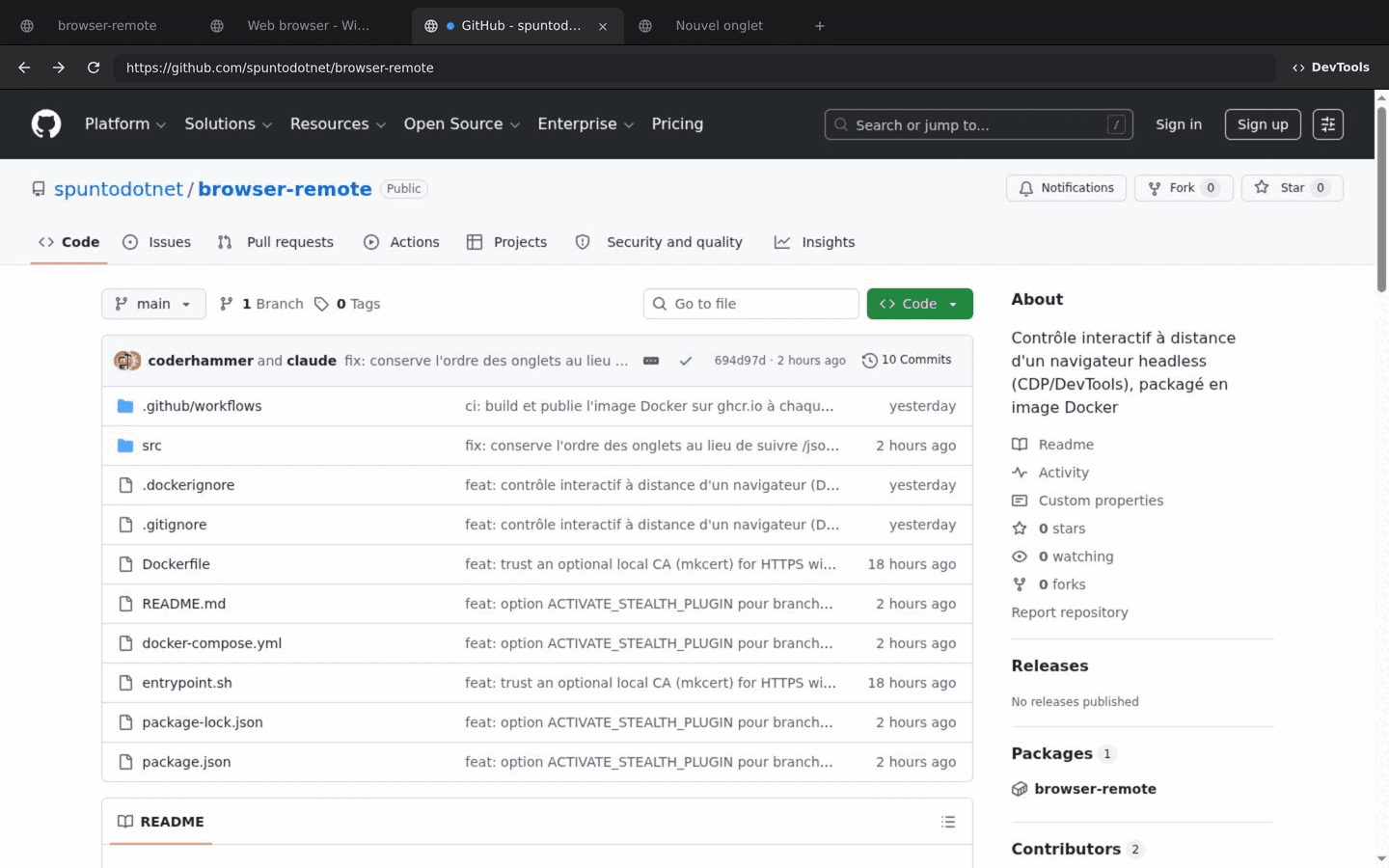
That's not a mockup — it's the actual UI, open on its own GitHub repo, which felt like the right thing to point it at for a screenshot. Tabs, back/forward/reload, an address bar you can type into, and the page itself streamed live as you interact with it.
Because I didn't want three moving parts where one would do. The usual way to get a "watchable" headless browser is either:
- browserless or similar — great, but it's another service to run, with its own opinions about session pooling and licensing, on top of the Chrome it wraps.
- A VNC-based setup — a full X server plus a VNC server plus a web client, to stream what amounts to a whole virtual desktop just to look at one browser window.
Both work. Both are also more infrastructure than the problem needs. Chrome already has a built-in way to stream exactly its own pixels and forward input back — the DevTools Protocol. browser-remote is just that, wired up directly: Chromium (the BSD-licensed one, apt install chromium, no separate binary to trust) plus a thin Node server, in one image.
The core trick is Page.startScreencast, a CDP method that makes Chrome push you a JPEG frame every time the page repaints. The server opens a CDP connection to the tab you're looking at, forwards those frames over a WebSocket to a <canvas> in the browser, and forwards mouse/keyboard events the other way with Input.dispatchMouseEvent / Input.dispatchKeyEvent. From the outside it just looks like the page is rendering directly in your canvas — it isn't, it's a screencast, but the round-trip is fast enough that you stop noticing.
The tab bar is a thin layer on top of the same protocol: Target.getTargets for the list, Target.activateTarget when you click one, Target.closeTarget when you close it. None of this needed a browser automation library — it's CDP calls the server already had a WebSocket open for.
DevTools was the fiddly part. Chrome ships its own DevTools frontend and will happily serve it to you, but it hardcodes the host it expects to be reached at — so an iframe pointing at /devtools/inspector.html works fine on localhost:3000 and breaks the moment you access the container through any kind of proxy or tunnel, because the Host header no longer matches what Chrome baked into the page. The fix is a small reverse-proxy layer in front of Chrome's own DevTools and /json/* endpoints that rewrites the Host on the way through, so the exact same iframe works whether you're on localhost or three proxies deep.
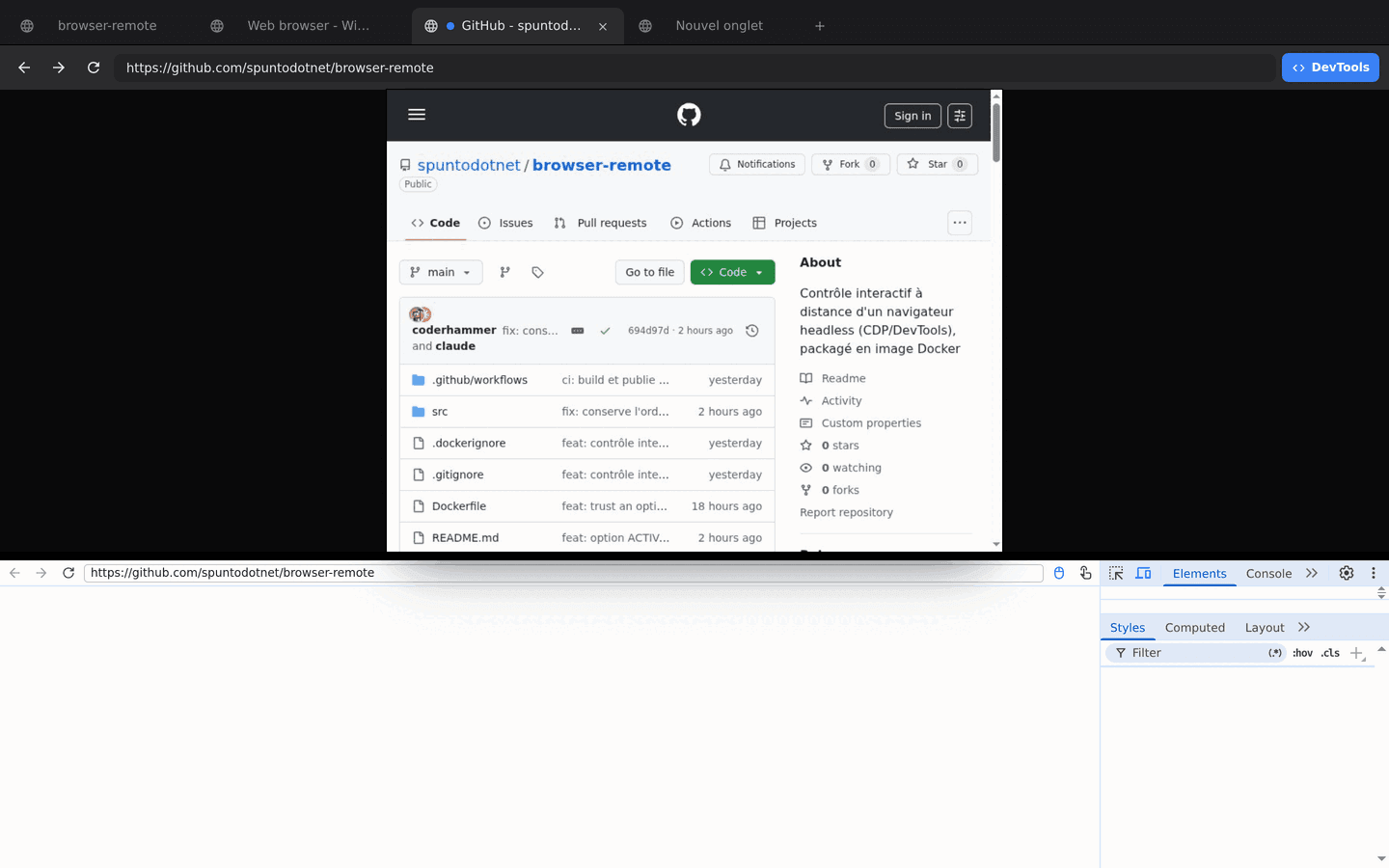
The web UI is one client of the CDP connection — nothing stops a script from being another. Since /json/* and /devtools/* are proxied straight through to Chrome, a Puppeteer script can attach to the exact same browser the tab bar is showing, open pages, and drive them directly:
import puppeteer from "puppeteer-core";

const CHROME_URL = "http://localhost:3000"; // or wherever the container is reachable

const { webSocketDebuggerUrl } = await (await fetch(`${CHROME_URL}/json/version`)).json();
const browserWSEndpoint = `${CHROME_URL.replace(/^http/, "ws")}${new URL(webSocketDebuggerUrl).pathname}`;

const browser = await puppeteer.connect({ browserWSEndpoint });
const page = await browser.newPage();
await page.goto("https://example.com");
await page.screenshot({ path: "out.png" });

await browser.disconnect(); // detach — leave Chrome (and the container) running
Two gotchas that cost me some time working this out:
- Don't pass
browserURLstraight topuppeteer.connect(). Chrome's own/json/versionreports its internal WebSocket address (ws://127.0.0.1:9222/...), which only makes sense from inside the container.puppeteer.connect({ browserURL })reads that field and tries to dial it directly, which fails the moment you're not literally onlocalhost. Fetching/json/versionyourself and swapping in the host you're actually using — the snippet above — routes the WebSocket through the same proxy as everything else,Hostrewriting included. browser.close()isn'tbrowser.disconnect(). Puppeteer's default assumption is that it launched the browser it's talking to, so.close()sendsBrowser.closeand kills the Chrome process — every tab, including whatever's open in the web UI..disconnect()just detaches your script's client. Since you're borrowing someone else's Chrome here,.close()is almost never what you want.
The nice part of sharing one CDP connection between the UI and a script: a tab your script opens shows up in the tab bar immediately, and a tab you opened by hand is just another entry in browser.pages(). Same browser, two ways of holding the wheel — hand off between them mid-session without losing cookies or state.
Mostly it ends up running next to whatever agent or script is doing the automating, as a second window I can flip over to. Instead of a Puppeteer script failing silently and leaving me to guess, I have a real page open, in a real tab, that I can click into and finish by hand if the automation gets stuck — same session, same cookies, no restart. And when a script does misbehave, DevTools is one click away on the exact page that's misbehaving, not a recreation of it.
It's a small tool. That's kind of the point — it does one thing (let you watch and drive a headless browser) without asking you to stand up a browser farm to get it.
Repo's here: spuntodotnet/browser-remote. Issues and PRs welcome.
Mathieu
Founder, SpuntoBuilding Spunto — self-hosted dev environments for engineers who want their compute to work for them, not against them.