
ClickUp + n8n + Spunto: spawn dev environments automatically from your tickets
When a ticket moves to "In Progress", a full dev environment appears. When it's done, it disappears. Here's how to wire it up in 20 minutes.

Mathieu
Founder, Spunto
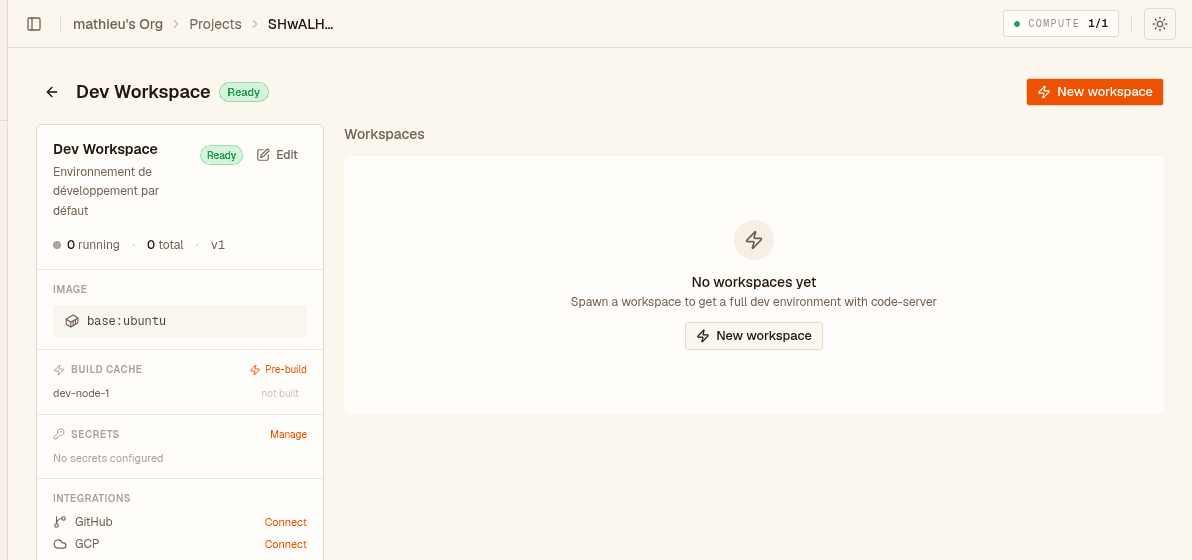
You pick up a ticket. You clone the repo. You install dependencies. You realise the environment needs a specific Node version. Twenty minutes later you haven't written a single line of code.
What if the dev environment was just there the moment you dragged the ticket to "In Progress" — a full IDE in your browser, already cloned, already configured?
That's what this automation does. When a ClickUp task status changes to In Progress, an n8n workflow calls the Spunto API to spawn a worker. When the task moves to Done (or In Review), the same workflow deletes it. No wasted compute, no context-switching tax.
- A Spunto account with at least one node online and a project configured
- An n8n instance — self-hosted or cloud (the self-hosted n8n guide covers deploying it as a Spunto service)
- A ClickUp workspace with admin access (to configure webhooks)
Go to Dashboard → Account settings → API keys and create a new key.
Name it something descriptive like n8n-clickup-automation. Under Scopes, select Workers: read and Workers: write — nothing else is needed.
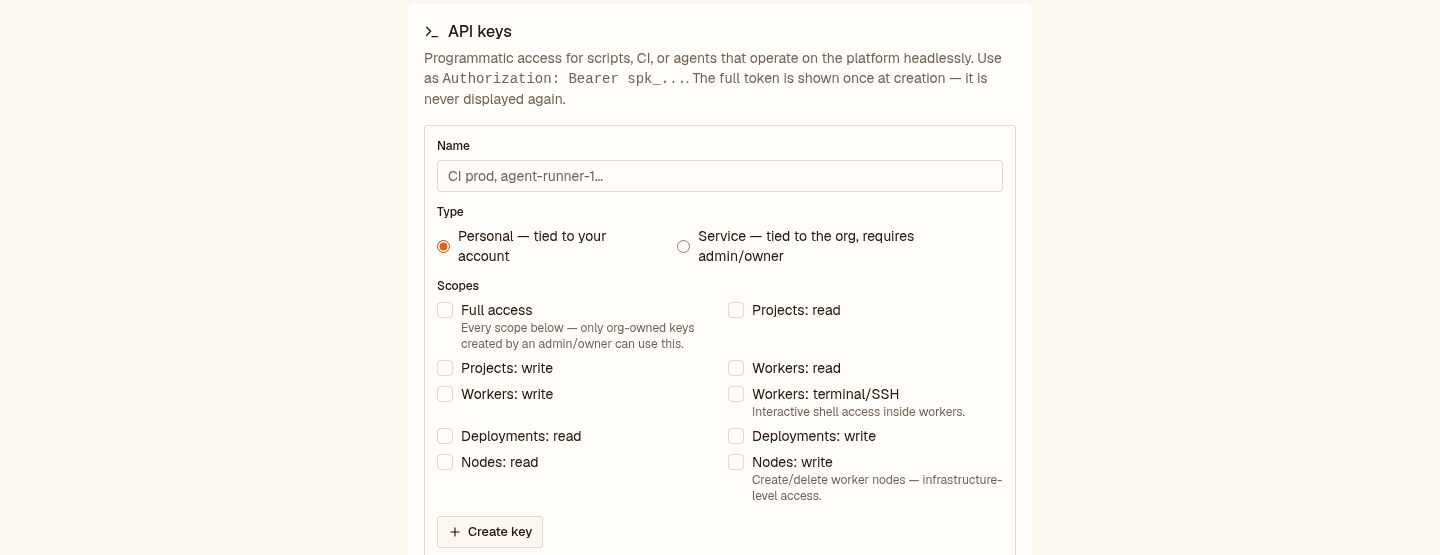
Copy the token when it appears — it's only shown once. It looks like spk_....
You'll also need two IDs from the Spunto dashboard URL:
| Value | Where to find it |
|---|---|
ORG_ID | The part after /dashboard/ in the URL (e.g. gXD0k-dQd...) |
PROJECT_ID | The part after /projects/ (e.g. SHwALHW1Z0...) |
In n8n, create a new workflow and import the JSON below (click ⋯ → Import from JSON in the top bar):
{
  "name": "ClickUp → Spunto Workers",
  "nodes": [
    {
      "name": "ClickUp Webhook",
      "type": "n8n-nodes-base.webhook",
      "typeVersion": 2,
      "position": [240, 300],
      "parameters": {
        "path": "clickup-spunto",
        "responseMode": "onReceived",
        "responseData": "firstEntryJson"
      }
    },
    {
      "name": "Extract fields",
      "type": "n8n-nodes-base.set",
      "typeVersion": 3,
      "position": [460, 300],
      "parameters": {
        "mode": "manual",
        "assignments": {
          "assignments": [
            {
              "name": "status",
              "value": "={{ $json.history_items[0].after.status.toLowerCase() }}",
              "type": "string"
            },
            {
              "name": "taskId",
              "value": "={{ $json.task_id }}",
              "type": "string"
            },
            {
              "name": "taskName",
              "value": "={{ $json.task.name }}",
              "type": "string"
            }
          ]
        }
      }
    },
    {
      "name": "Route by status",
      "type": "n8n-nodes-base.switch",
      "typeVersion": 3,
      "position": [680, 300],
      "parameters": {
        "mode": "rules",
        "dataType": "string",
        "value1": "={{ $json.status }}",
        "rules": {
          "rules": [
            { "operation": "equals", "value2": "in progress", "output": 0 },
            { "operation": "equals", "value2": "done", "output": 1 },
            { "operation": "equals", "value2": "in review", "output": 1 }
          ]
        },
        "fallbackOutput": "none"
      }
    },
    {
      "name": "Spawn worker",
      "type": "n8n-nodes-base.httpRequest",
      "typeVersion": 4,
      "position": [900, 160],
      "parameters": {
        "method": "POST",
        "url": "https://spunto.net/api/orgs/ORG_ID/projects/PROJECT_ID/workers",
        "authentication": "genericCredentialType",
        "genericAuthType": "httpHeaderAuth",
        "options": {},
        "sendHeaders": true,
        "headerParameters": {
          "parameters": [
            { "name": "Authorization", "value": "Bearer YOUR_API_KEY" }
          ]
        }
      }
    },
    {
      "name": "Comment worker URL",
      "type": "n8n-nodes-base.httpRequest",
      "typeVersion": 4,
      "position": [1120, 160],
      "parameters": {
        "method": "POST",
        "url": "=https://api.clickup.com/api/v2/task/{{ $('Extract fields').item.json.taskId }}/comment",
        "sendHeaders": true,
        "headerParameters": {
          "parameters": [
            { "name": "Authorization", "value": "YOUR_CLICKUP_TOKEN" },
            { "name": "Content-Type", "value": "application/json" }
          ]
        },
        "sendBody": true,
        "bodyParameters": {
          "parameters": [
            {
              "name": "comment_text",
              "value": "=🚀 Worker spawned by Spunto\\nID: {{ $('Spawn worker').item.json.id }}\\nURL: {{ $('Spawn worker').item.json.url }}"
            }
          ]
        }
      }
    },
    {
      "name": "Get task comments",
      "type": "n8n-nodes-base.httpRequest",
      "typeVersion": 4,
      "position": [900, 440],
      "parameters": {
        "method": "GET",
        "url": "=https://api.clickup.com/api/v2/task/{{ $json.taskId }}/comment",
        "sendHeaders": true,
        "headerParameters": {
          "parameters": [
            { "name": "Authorization", "value": "YOUR_CLICKUP_TOKEN" }
          ]
        }
      }
    },
    {
      "name": "Extract worker ID",
      "type": "n8n-nodes-base.code",
      "typeVersion": 2,
      "position": [1120, 440],
      "parameters": {
        "jsCode": "const comments = $input.item.json.comments || [];\nconst match = comments\n  .map(c => c.comment_text)\n  .find(t => t && t.includes('ID: '));\nif (!match) throw new Error('No Spunto worker comment found on this task');\nconst workerId = match.match(/ID: ([\\\\w-]+)/)?.[1];\nreturn [{ json: { workerId } }];"
      }
    },
    {
      "name": "Delete worker",
      "type": "n8n-nodes-base.httpRequest",
      "typeVersion": 4,
      "position": [1340, 440],
      "parameters": {
        "method": "DELETE",
        "url": "=https://spunto.net/api/orgs/ORG_ID/projects/PROJECT_ID/workers/{{ $json.workerId }}",
        "sendHeaders": true,
        "headerParameters": {
          "parameters": [
            { "name": "Authorization", "value": "Bearer YOUR_API_KEY" }
          ]
        }
      }
    }
  ],
  "connections": {
    "ClickUp Webhook": { "main": [[{ "node": "Extract fields", "type": "main", "index": 0 }]] },
    "Extract fields": { "main": [[{ "node": "Route by status", "type": "main", "index": 0 }]] },
    "Route by status": {
      "main": [
        [{ "node": "Spawn worker", "type": "main", "index": 0 }],
        [{ "node": "Get task comments", "type": "main", "index": 0 }]
      ]
    },
    "Spawn worker": { "main": [[{ "node": "Comment worker URL", "type": "main", "index": 0 }]] },
    "Get task comments": { "main": [[{ "node": "Extract worker ID", "type": "main", "index": 0 }]] },
    "Extract worker ID": { "main": [[{ "node": "Delete worker", "type": "main", "index": 0 }]] }
  }
}
Then replace the three placeholder values before activating:
| Placeholder | Replace with |
|---|---|
ORG_ID | Your Spunto organization ID |
PROJECT_ID | Your Spunto project ID |
YOUR_API_KEY | The spk_... key you just created |
YOUR_CLICKUP_TOKEN | Your ClickUp personal API token (from ClickUp → Profile → Apps) |
In ClickUp, go to Settings → Integrations → Webhooks → + New webhook:
- Endpoint: copy the webhook URL from the ClickUp Webhook n8n node (looks like
https://your-n8n.domain/webhook/clickup-spunto) - Status: Active
- Events: check Task status updated
- Space / Folder / List: scope it to the list where your dev tickets live
Save. ClickUp will start sending a POST to n8n every time a task status changes in that list.
- In n8n, toggle the workflow to Active
- In ClickUp, move a test ticket to In Progress
- Check the n8n execution log — you should see a green run with all nodes passing
- In Spunto, go to your project — a new worker named after the project should appear
Open the worker and click Open in browser — you get a full IDE, cloned and ready.
When you move the ticket to Done, check the n8n log again — you'll see the delete branch run, the worker disappears from Spunto, and the compute is freed.
The automation uses ClickUp task comments as a lightweight state store:
- On spawn: the workflow posts a comment on the task —
🚀 Worker spawned by Spunto\nID: abc123\nURL: https://... - On delete: the workflow fetches all comments on the task, finds the one containing
ID:, extracts the worker ID, and callsDELETE /workers/:id
This is simple and auditable — anyone on the team can see the worker URL directly in the task, and the worker ID is always traceable to its ticket.
The workflow routes on "in progress" and "done" / "in review". These are ClickUp's default status names — but your workspace may use different names ("development", "qa", "complete", etc.).
To change them, open the Route by status switch node in n8n and update the string values. The comparison is case-insensitive because the Extract fields node lowercases the status first.
To add a third trigger (e.g. "testing" → stop the worker but keep it, to resume later), add a third output to the switch and connect it to a POST /workers/:id/stop HTTP request instead of delete.
- Multiple projects: parameterise the workflow with a ClickUp custom field that maps list IDs to Spunto project IDs — one workflow handles all your dev lists
- Notify on ready: Spunto workers go through a setup phase (image build, repo clone). Poll
GET /workers/:iduntilstatus == "running"before posting the comment, so the URL in the ticket is always clickable immediately - Secrets per ticket: use Spunto's project secrets API to inject the ClickUp task ID as
CLICKUP_TASK_IDenv var inside the worker — handy for scripts that need to update the ticket from inside the dev environment
Mathieu
Founder, SpuntoBuilding Spunto — self-hosted dev environments for engineers who want their compute to work for them, not against them.