Skip the tour. Use it.
This panel mounts the dashboard’s own components against an in-memory backend: the same project form, the same “New workspace” dialog, the same card climbing the same state machine, the same terminal. It walks itself once — then it’s yours to poke at.
 Dev Containers
Node.js 20 + TypeScript, npm/yarn/pnpm
mcr.microsoft.com/devcontainers/typescript-node:20Cloned into /workspace/<path> at worker startup, on the branch set here (empty = the remote's default).
Git URL repos (GitLab, Gitea, Bitbucket, self-hosted…) are cloned with this project's SSH deploy key. After saving, register the public key shown on the project page as a read-only deploy key on each repo. https:// URLs to public repos work without a key.
 coderhammer
Docker Engine inside the container (DinD)
ghcr.io/coderhammer/features/docker-in-docker:3coderhammerAnthropic's coding agent, installed in the workspace
ghcr.io/coderhammer/features/claude-code:12 features selected — installed at worker startup
the real project form — pick another image, add a repo, it's yours to poke
the first pillar
Describe. Launch. Throw away.
Spunto uses the devcontainer spec you may already have in your repo, so the description isn’t a new format to learn — it’s the one your editor already understands. What Spunto adds is everything after it: the launching, the routing, the terminal, the cleanup.
move 1
Describe it once
Base image, devcontainer features, the repos to clone, the ports, the secrets, and the commands to run on create and on start. The knowledge that currently lives in one person's shell history, written down once.
move 2
Launch it in seconds
A container boots from that spec with your repos already cloned and your hooks already run. An IDE in the browser, a terminal that survives a page reload, SSH if you prefer your own editor, and every port on its own URL.
move 3
Throw it away
The environment is disposable, not precious. Break it, delete it, launch another — or five at once for five branches. Nothing accumulates on your laptop, and nothing was configured by hand to begin with.
- editor
- An IDE in the browser, or SSH into it from your own — including JetBrains Gateway
- terminal
- persistent: it survives a page reload, a laptop lid, and a change of network
- ports
- each one gets its own https URL, no tunnel to set up
- secrets
- per project, injected at boot; never in the repo, never in a screenshot
- versions
- a project is versioned, so a workspace can tell you it's running an older spec
No region picker. No egress bill.
Spunto doesn’t rent you compute. You paste one docker run on a machine you already own and it joins the pool — a cheap VPS, the workstation that’s idle at night, a box in a colo. Work lands on whichever one has room.
Which also settles the question everyone asks second: your source is cloned onto your machines and stays there. The control plane schedules and routes; it never stores your code.
- joining
- one docker run with a token; the agent connects over a WebSocket within seconds
- scheduling
- least-loaded node by default, or pick the machine yourself
- isolation
- one Docker network per workspace, no ports published on the host
- going away
- a machine can leave; its workspaces are gone, nothing else notices
IDE · :3000
ssh · postgres 16
agent · via API
free for more
environments land on whichever machine has room
machines you already own · no kubernetes anywhere
The thing you built has to run somewhere.
Deployments are groups of Docker services sharing a private network — a database, a cache, your API — on the same machines your workspaces run on. Custom domain, automatic TLS, pre-deploy hooks, and a rollback to the previous version when it goes wrong.
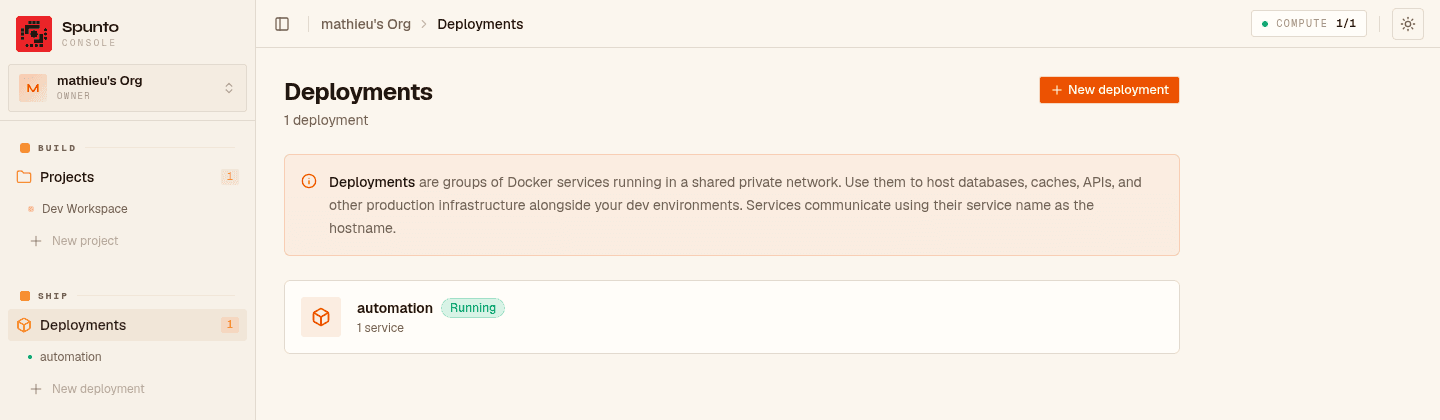
- ship
- Docker services with a private network, your domain, automatic TLS
- hooks
- run migrations before traffic moves; fail the deploy if they fail
- rollback
- the previous version is one click away, because it's still there
- run
- live logs, per-machine CPU and memory, for workspaces and production alike
- jobs
- long actions run as durable jobs that survive a redeploy, with their history
- traces
- OpenTelemetry through the whole stack, from the edge proxy inward
An API key, and it runs itself.
Every button in the console is a REST call, and every REST call takes an API key. So an agent can spawn its own sandbox for a task, clone the repo, run the suite, read the logs, and delete the whole thing when the pull request is open — without a human in the loop and without touching your laptop.
# spawn a workspace for an agent, wait for it, tear it down
curl -X POST "$SPUNTO/api/orgs/$ORG/projects/$PROJECT/workers" \
  -H "Authorization: Bearer $SPUNTO_API_KEY" \
  -d '{"name":"agent-atlas"}'

# …work happens in the container…

curl -X DELETE "$SPUNTO/api/orgs/$ORG/workers/$WORKER" \
  -H "Authorization: Bearer $SPUNTO_API_KEY"
The full surface is documented at /api/docs, generated from the routes themselves.
agent atlas · fix #482 · checkout total
agent juno · bump postgres 15 → 16
agent vega · try the tailwind v4 codemod
three agents, three workspaces — the console’s own cards
Free during the beta. Then not free.
No credit card, no trial clock, no seat counting while the beta lasts — and you already own the expensive part, so “free” here means the control plane, not the compute. When the beta ends there will be a paid plan, and the pricing page says what we’re thinking.
And if it turns out you only ever wanted the workspaces, on one machine, with nobody to share them with — Spunto Lite does exactly that, for nothing, forever. Same project spec, so it isn’t a decision you have to get right today.