A tab bar. An address bar. A page you can click.
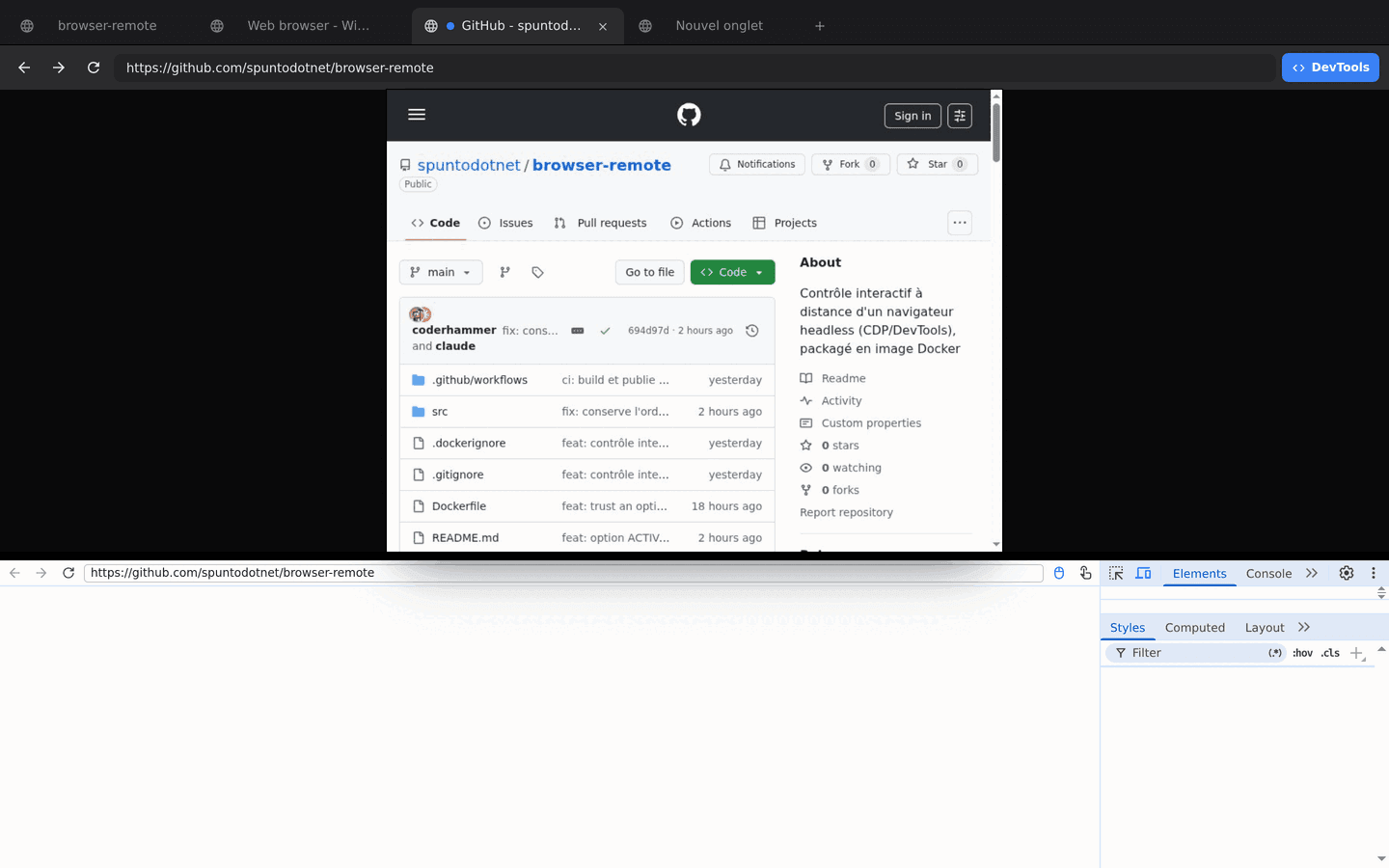
Point your own browser at the container and you’re driving. Tabs, back, forward, reload, an address bar you can type into, and the page streamed live as you interact with it — the sort of view you’d get from screen-sharing someone’s laptop.
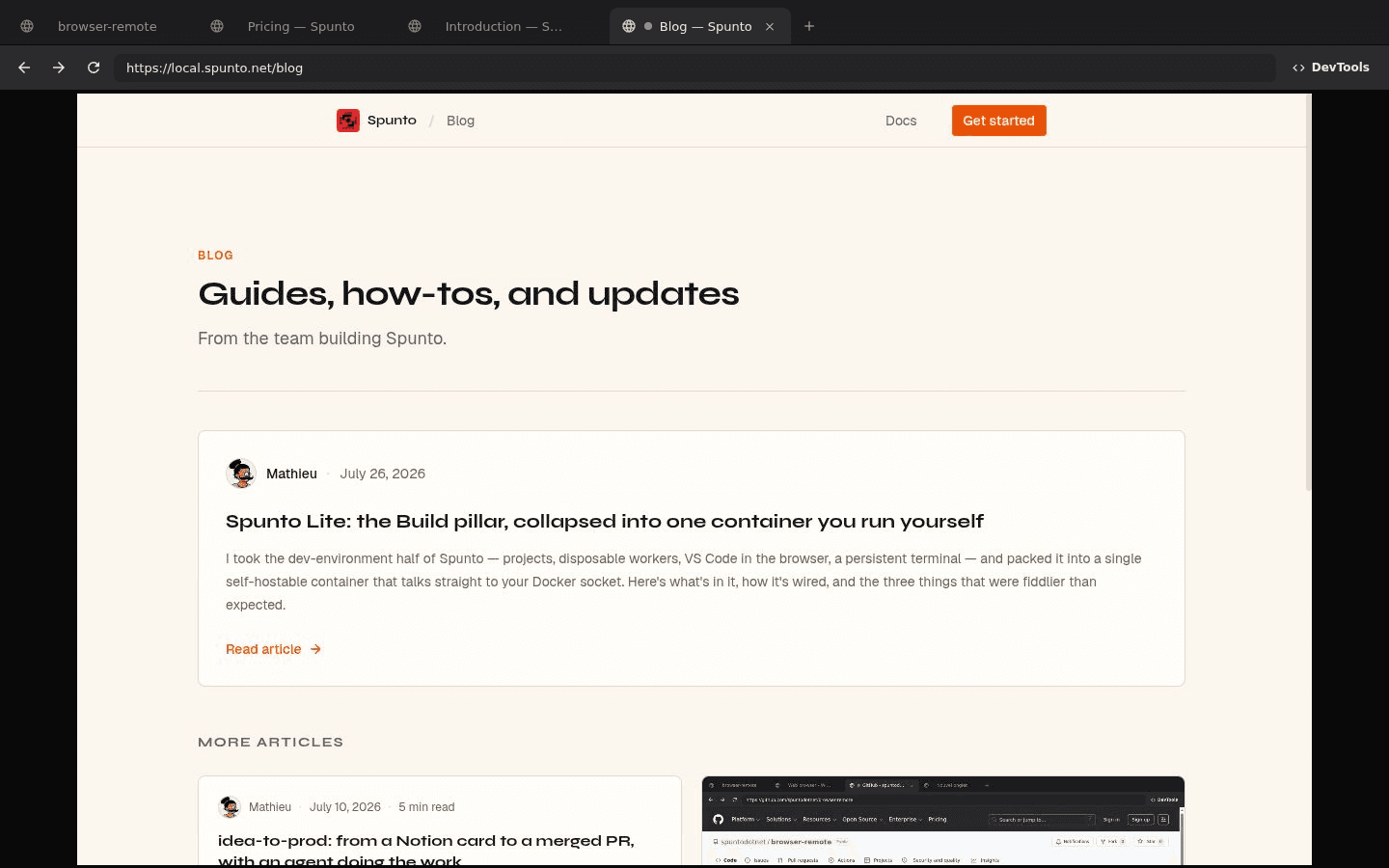
- tabs
- real ones — open, switch, close; a tab your script opens shows up here immediately
- live view
- Chrome's own screencast, with your mouse and keyboard forwarded back
- devtools
- the full panel, docked in the same page, on the exact tab that's misbehaving
- inside
- Chromium from apt — the BSD-licensed one, no separate binary to trust
read this bit
There is no authentication in front of any of this. Anyone who can reach the port has full control of the browser, including whatever it happens to be logged into. It’s made for a private network or something you put in front of it — not for the open internet as is.
Chrome already knows how to do this.
The usual ways to get a watchable headless browser are a session-pooling service wrapped around the Chrome you already have, or a full X server plus a VNC server plus a web client — streaming an entire virtual desktop to look at one window.
Both work. Both are more infrastructure than the problem needs. Chrome has a built-in way to stream its own pixels and forward input back — the DevTools Protocol. This is that, wired up directly: Chromium plus a thin Node server, in one image.
how it’s wired
- screencast
Page.startScreencastmakes Chrome push a JPEG frame on every repaint; the server forwards them over a WebSocket to a canvas.- input
Input.dispatchMouseEvent/dispatchKeyEventgo back the other way. The round-trip is fast enough that you stop noticing it isn’t your browser.- tab bar
Target.getTargets,activateTarget,closeTarget— no automation library needed, just the socket that was already open.- devtools
- Chrome bakes the host it expects into its own DevTools frontend, so a small proxy rewrites the Host header on the way through. Same iframe works on localhost or three proxies deep.
Two hands on the same wheel.
/json/* and /devtools/* are proxied straight through, so a Puppeteer or Playwright script attaches to the exact browser the tab bar is showing. A tab your script opens appears in the bar immediately; a tab you opened by hand is just another entry in browser.pages().
Which means you can hand off mid-session without losing cookies or state: let the script get stuck, then finish the flow by hand in the same tab.
- browserURL
- Don’t hand it straight to
puppeteer.connect(). Chrome’s/json/versionreports its internal WebSocket address —ws://127.0.0.1:9222/…— which only makes sense inside the container. Fetch it yourself and swap the host in, as above. - close vs disconnect
browser.close()sendsBrowser.closeand kills the Chrome process — every tab, including whatever’s open in the UI. You’re borrowing someone else’s browser here, so.disconnect()is almost always what you want.
import puppeteer from "puppeteer-core";

const CHROME_URL = "http://localhost:3000"; // wherever the container is

// Chrome reports its *internal* ws address, so swap in the host you're using
const { webSocketDebuggerUrl } = await (await fetch(`${CHROME_URL}/json/version`)).json();
const browserWSEndpoint = `${CHROME_URL.replace(/^http/, "ws")}${new URL(webSocketDebuggerUrl).pathname}`;

const browser = await puppeteer.connect({ browserWSEndpoint });
const page = await browser.newPage();
await page.goto("https://example.com");

await browser.disconnect(); // detach — leave Chrome (and the container) runningservices:
browser:
image: ghcr.io/spuntodotnet/browser-remote:latest
ports:
- "3000:3000"A handful of env vars exist for later: a custom CA so it trusts your local mkcert certificates, a different Chrome binary path, and an opt-in anti-fingerprinting flag that’s off by default. All in the README.
The window an agent can’t give you.
An agent driving a headless browser is a black box: it says the click didn’t work, and you have a stack trace. Run this next to it and there’s a real page, in a real tab, that you can watch it work in — and click into yourself when it gets stuck, same session, same cookies, no restart.
That’s how this site is tested, incidentally: every screenshot on it was taken by a script driving this browser, in a Spunto workspace, and the same browser is what a human opens to check the result.